Tiedosto:Riemann sphere1.jpg
Siirry navigaatioon
Siirry hakuun
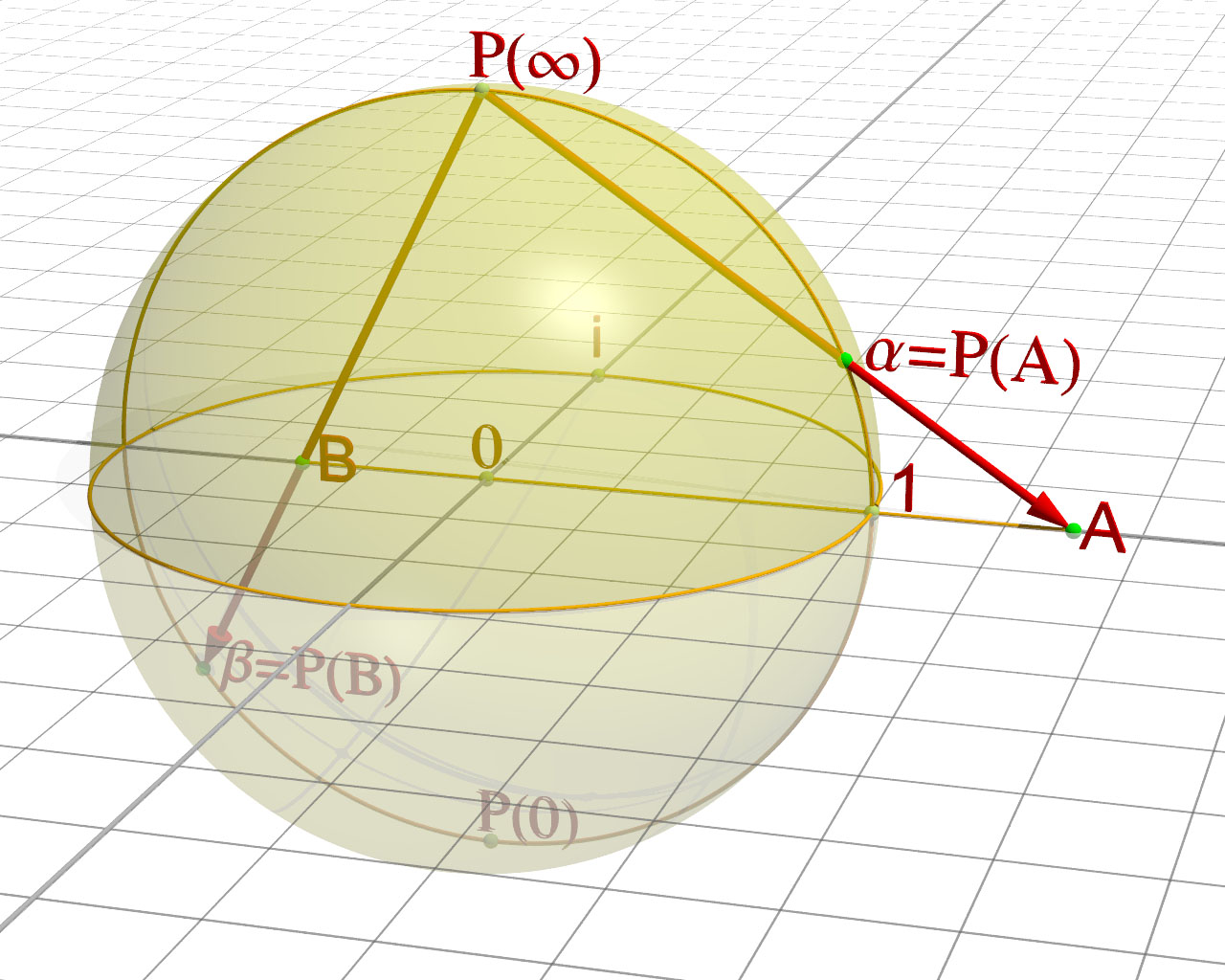
Tämän esikatselun koko: 750 × 600 kuvapistettä. Muut resoluutiot: 300 × 240 kuvapistettä | 600 × 480 kuvapistettä | 960 × 768 kuvapistettä | 1 280 × 1 024 kuvapistettä.
Alkuperäinen tiedosto (1 280 × 1 024 kuvapistettä, 215 KiB, MIME-tyyppi: image/jpeg)

|
Tästä tiedostosta on saatavilla myös SVG-versio eli vektorigrafiikkatiedosto. SVG-versiota tulisi suosia, mikäli se on laadultaan tätä rasterikuvaa parempi.
File:Riemann sphere1.jpg → File:Riemann sphere1.svg
|
 |


Yhteenveto
| Kuvaus |
Sphère de Riemann, démonstration de la projection English: rendering of the graph of the Sphere of Rieman |
| Lähde | Oma teos. Merci à Friedrich A. Lohmüller pour sa bibliothèque POV. |
| Tekijä | Jean-Christophe BENOIST |
//------------------------------------------------------------------------
#version 3.6;
global_settings {  assumed_gamma 1 }
//------------------------------------------------------------------------
#include "colors.inc"
#include "textures.inc"
#include "glass.inc"
#include "metals.inc"
#include "golds.inc"
#include "stones.inc"
#include "woods.inc"
#include "shapes.inc"
#include "shapes2.inc"
#include "functions.inc"
#include "math.inc"
#include "transforms.inc"
//------------------------------------------------------------------------
#declare Camera_0 = camera {                                 // xy-view
                             angle 20
                             location  <8.0 , 8.0 ,-24.0>
                             right     x*image_width/image_height
                             look_at   <1 , 0 , 0>
                           }

#declare Camera_1 = camera {                                // diagonal view
                             angle 9
                             location  <15.0 ,15 ,-60.0>
                             right     x*image_width/image_height
                             look_at   <1 , 0 , 0>
                           }
#declare Camera_2 = camera {                               // yz-view
                             angle 20
                             location  <31.0 , 7.0 ,1.0>
                             right     x*image_width/image_height
                             look_at   <0 , 0 , 0>
                           }
#declare Camera_3 = camera {
                             angle 20
                             location  < 0.0 , 37.5 ,-0.0001>
                             right     x*image_width/image_height
                             look_at   <0 , 0 , 0>
                           }

camera{Camera_0}

//------------------------------------------------------------------------
// sun -------------------------------------------------------------------
light_source{<3000,5500,-1000> color White }
// sky -------------------------------------------------------------------
sky_sphere{ pigment{ gradient <0,1,0>
                     color_map{ [0   color rgb<1,1,1>         ]//White
                                [0.4 color rgb<1,1,1>]  //~Navy
                                [0.6 color rgb<1,1,1>]  //<0.14,0.14,0.56>]//~Navy
                                [1.0 color rgb<1,1,1>         ]//White
                              }
                     scale 2 }
           } // end of sky_sphere
//------------------------------------------------------------------------


//------------------------------ the Axes --------------------------------
//------------------------------------------------------------------------
#macro Axis_( AxisLen, Dark_Texture,Light_Texture)
 union{
    cylinder { <0,-AxisLen-3,0>,<0,AxisLen,0>,0.017
               texture{checker texture{Dark_Texture }
                               texture{Light_Texture}
                       translate<0.1,0,0.1>}
             }
    cone{<0,AxisLen,0>,0.1,<0,AxisLen+0.3,0>,0
          texture{Dark_Texture}
         }
     } // end of union
#end // of macro "Axis()"
//------------------------------------------------------------------------
#macro AxisXYZ( AxisLenX, AxisLenY, AxisLenZ, Tex_Dark, Tex_Light)
//--------------------- drawing of 3 Axes --------------------------------
union{
#if (AxisLenX != 0)
 object { Axis_(AxisLenX, Tex_Dark, Tex_Light)   rotate< 0,0,-90>}// x-Axis
 text   { ttf "arial.ttf",  " ",  0.15,  0  texture{Tex_Dark}
          scale 0.5 translate <AxisLenX+0.05,0.4,-0.10>}
#end // of #if
#if (AxisLenY != 0)
 object { Axis_(AxisLenY, Tex_Dark, Tex_Light)   rotate< 0,0,  0>}// y-Axis
 text   { ttf "arial.ttf",  "z",  0.15,  0  texture{Tex_Dark}
           scale 0.5 translate <-0.55,AxisLenY+0.20,-0.10>}
#end // of #if
#if (AxisLenZ != 0)
 object { Axis_(AxisLenZ, Tex_Dark, Tex_Light)   rotate<90,0,  0>}// z-Axis
 text   { ttf "arial.ttf",  " ",  0.15,  0  texture{Tex_Dark}
               scale 0.5 translate <-0.55,0.1,AxisLenZ+0.10>}
#end // of #if
} // end of union
#end// of macro "AxisXYZ( ... )"
//------------------------------------------------------------------------

#declare Texture_A_Dark  = texture {
                               pigment{color rgb<0.5,0.5,0.5>}
                               finish {ambient 0.15 diffuse 0.85 phong 1}
                             }
#declare Texture_A_Light = texture {
                               pigment{color rgb<1,1,1>}
                               finish {ambient 0.15 diffuse 0.85 phong 1}
                             }


object{ AxisXYZ( 25.0, 0, 25.0, Texture_A_Dark, Texture_A_Dark)} // <<<<<<<<<<<<<<<<< adapt the axes here !!!


#declare        TextScale=0.5;

//-------------------------------------------------- end of coordinate axes


// ground -----------------------------------------------------------------
//---------------------------------<<< settings of squered plane dimensions
#declare RasterScale = 2.0/2;
#declare RasterHalfLine  = 0.03/4;
#declare RasterHalfLineZ = 0.03/2;
//-------------------------------------------------------------------------
#macro Raster(RScale, HLine)
       pigment{ gradient x scale RScale
                color_map{[0.000   color rgbt<1,1,1,1>*0.2]
                          [0+HLine color rgbt<1,1,1,1>*0.2]
                          [0+HLine color rgbt<1,1,1,1>]
                          [1-HLine color rgbt<1,1,1,1>]
                          [1-HLine color rgbt<1,1,1,1>*0.2]
                          [1.000   color rgbt<1,1,1,1>*0.2]} }
       finish { ambient 0.15 diffuse 0.85}
 #end// of Raster(RScale, HLine)-macro
//-------------------------------------------------------------------------


plane { <0,1,0>, 0    // plane with layered textures
        texture { pigment{color rgbt<1,1,1,0.7>*1.1}
                  finish {ambient 0.45 diffuse 0.85}}
        texture { Raster(RasterScale,RasterHalfLine ) rotate<0,0,0> }
        texture { Raster(RasterScale,RasterHalfLineZ) rotate<0,90,0>}
        rotate<0,0,0>
        no_shadow
      }
//------------------------------------------------ end of squered plane XZ


//
//------------------------------------------------------------------------------------
#include "analytical_g.inc"


//--------------------------------------------------------------------------
//---------------------------- objects in scene ----------------------------
//--------------------------------------------------------------------------
#default{ finish {ambient 0.15 diffuse 0.85} } //


//-----------------------------------------------------------------------------------
#declare Rl  = 0.035; // radius of lines  - Radius der Strecken
#declare Rp  = 0.06; // radius of points - Radius der Punkte


//------------------------------------------------------------------------------------
// -----------------------------------------------------------------------------------

// -----------------------------------------------------------------------------------
// ---------------------  Punti e Vettori  - Punkte und Vektoren -  Points and Vectors
//------------------------------------------------------------------------------------

#declare M1 = < 0, 0.0,0.0>;
#declare R1  = 3;

#declare M2  = < 0.0,0.0, 0.0>;
#declare Rx  = 3.00;
#declare Ry  = 1.00;
#declare Rz  = 2.00;

#declare P1   = < 3, 0, 0>;
#declare Pi   = < 0, 0, 3>;
#declare PPinf = < 0, 3, 0>;
#declare PP0   = < 0, -3, 0>;
#declare P0   = <0,0,0>;

sphere{ P1, Rp  pigment{color YellowGreen}}
text { ttf "arial.ttf", "1",0.1,0
       scale TextScale rotate<0,0,0> translate P1+<0.2,0.1,-0.2> pigment{ color Red } no_shadow}


sphere{ Pi, Rp  pigment{color YellowGreen}}
text { ttf "arial.ttf", "i",0.1,0
       scale TextScale rotate<0,0,0> translate Pi+<-0.1,0.1,0.2> pigment{ color Red } no_shadow}


sphere{ PPinf, Rp  pigment{color YellowGreen}}
text { ttf "Mathematica1.ttf", concat("R(",chr(165),")"),0.1,0
       scale TextScale rotate<0,0,0> translate PPinf+<-0.1,0.1,0> pigment{ color Red } no_shadow}


sphere{ PP0, Rp  pigment{color YellowGreen}}
text { ttf "Mathematica1.ttf", "R(0)",-0.1,0
       scale TextScale rotate<0,0,0> translate PP0+<-0.1,0.1,0> pigment{ color Red } no_shadow}

sphere{ P0, Rp  pigment{color YellowGreen}}
text { ttf "Mathematica1.ttf", "0",-0.1,0
       scale TextScale rotate<0,0,0> translate P0+<-0.1,0.1,0> pigment{ color Red } no_shadow}


//object{ Show_Yxz( M1, Rl/2) pigment{ color Yellow }}
//object{ Show_Yxz( M2, Rl/2) pigment{ color Yellow }}
//------------------------------------------------------------------------------------
// --------------------------------------------------------------- Zeichnen ----------
// ---------------------------------------------------------------- Drawing ----------


#declare RSphere=
object {
        sphere{ M1, R1                          pigment{ color Yellow transmit 0.6 } finish {phong 0.3}}
}


#declare PPlan1 = <4.5,0,0>;

object{ Vector (PPinf, PPlan1, Rl)
         pigment{color Red}}

sphere{ PPlan1, Rp  pigment{color Green}}
object{ Show_Yxz( PPlan1, Rl/2)
        pigment{ color Orange }}
text { ttf "arial.ttf", "A",0.1,0
       scale TextScale rotate<0,0,0> translate PPlan1+<0.1,0.0,-0.4> pigment{ color Red } no_shadow}

// point of intersection
#declare Hit_the_Object =  trace ( RSphere, PPinf, PPlan1 - PPinf );

sphere{ Hit_the_Object, Rp  pigment{color Green}}
text { ttf "Mathematica1.ttf", "a=R(A)",0.1,0
       scale TextScale rotate<0,0,0> translate Hit_the_Object+<0.2,0.0,-0.2> pigment{ color Red } no_shadow}


#declare PPlan2 = <-1.5,0,0>;


sphere{ PPlan2, Rp  pigment{color Green}}
object{ Show_Yxz( PPlan2, Rl/2)
        pigment{ color Orange }}
text { ttf "arial.ttf", "B",0.1,0
       scale TextScale rotate<0,0,0> translate PPlan2+<0.3,0.0,-0.4> pigment{ color Red } no_shadow}

// point of intersection
#declare Hit_the_Object =  trace ( RSphere, PPinf, PPlan2 - PPinf );

object{ Vector (PPinf, Hit_the_Object, Rl)
         pigment{color Red}}

sphere{ Hit_the_Object, Rp  pigment{color Green}}
text { ttf "Mathematica1.ttf", "b=R(B)",0.1,0
       scale TextScale rotate<0,0,0> translate Hit_the_Object+<0.2,0.0,-0.2> pigment{ color Red } no_shadow}


object {RSphere}
Lisenssi
Minä, tämän teoksen tekijänoikeuksien haltija, julkaisen täten tämän teoksen seuraavilla lisensseillä:

|
Voit kopioida, levittää ja/tai muuttaa tätä asiakirjaa GNU Free Documentation License -lisenssin version 1.2 tai minkä tahansa Free Software Foundationin julkaiseman myöhemmän version ehtojen alaisena; ei koske muuttumattomia kohtia, etukannen tekstejä eikä takakannen tekstejä. Kopio tästä lisenssistä on saatavilla osiossa GNU Free Documentation License. |
  
|
Tämä tiedosto on lisensoitu Creative Commons Nimeä-JaaSamoin 3.0 Ei sovitettu -lisenssillä. | |
| ||
| Lisensointimerkintä lisätiin tähän tiedostoon osana GFDL-lisensointipäivitystä. |

Tämä tiedosto on lisensoitu Creative Commons Nimeä-JaaSamoin 2.5 Yleinen, 2.0 Yleinen ja 1.0 Yleinen -lisensseillä.
- Voit:
- jakaa – kopioida, levittää ja esittää teosta
- remiksata – valmistaa muutettuja teoksia
- Seuraavilla ehdoilla:
- nimeäminen – Sinun on mainittava lähde asianmukaisesti, tarjottava linkki lisenssiin sekä merkittävä, mikäli olet tehnyt muutoksia. Voit tehdä yllä olevan millä tahansa kohtuullisella tavalla, mutta et siten, että annat ymmärtää lisenssinantajan suosittelevan sinua tai teoksen käyttöäsi.
- jaa samoin – Jos muutat tai perustat tähän työhön, voit jakaa tuloksena syntyvää työtä vain tällä tai tämän kaltaisella lisenssillä.
Voit valita haluamasi lisenssin.
Tiedoston historia
Päiväystä napsauttamalla näet, millainen tiedosto oli kyseisellä hetkellä.
| Päiväys | Pienoiskuva | Koko | Käyttäjä | Kommentti | |
|---|---|---|---|---|---|
| nykyinen | 4. kesäkuuta 2007 kello 17.11 | | 1 280 × 1 024 (215 KiB) | wikimediacommons>Jean-Christophe BENOIST | == Description == {{Information |Description=Sphère de Riemann, démonstration de la projection |Source=Oeuvre personnelle. Merci à Friedrich A. Lohmüller pour sa bibliothèque POV. |Date= |Author=[[:fr:User:Jean-Christophe BENOIST|Jean-Christophe BENO |
Tiedoston käyttö
Seuraavat 3 sivua käyttävät tätä tiedostoa:
